
When you host a live event on Insight Timer, you have access to a clean, intuitive hosting interface designed to help you manage your session and connect with your audience. Our platform makes it easy to deliver meditation, mindfulness, yoga, breathwork, and other practices to your community members from anywhere in the world. Below is a complete and detailed guide to understanding all the key features available during your live event.
Understanding the Live Event Hosting Screen
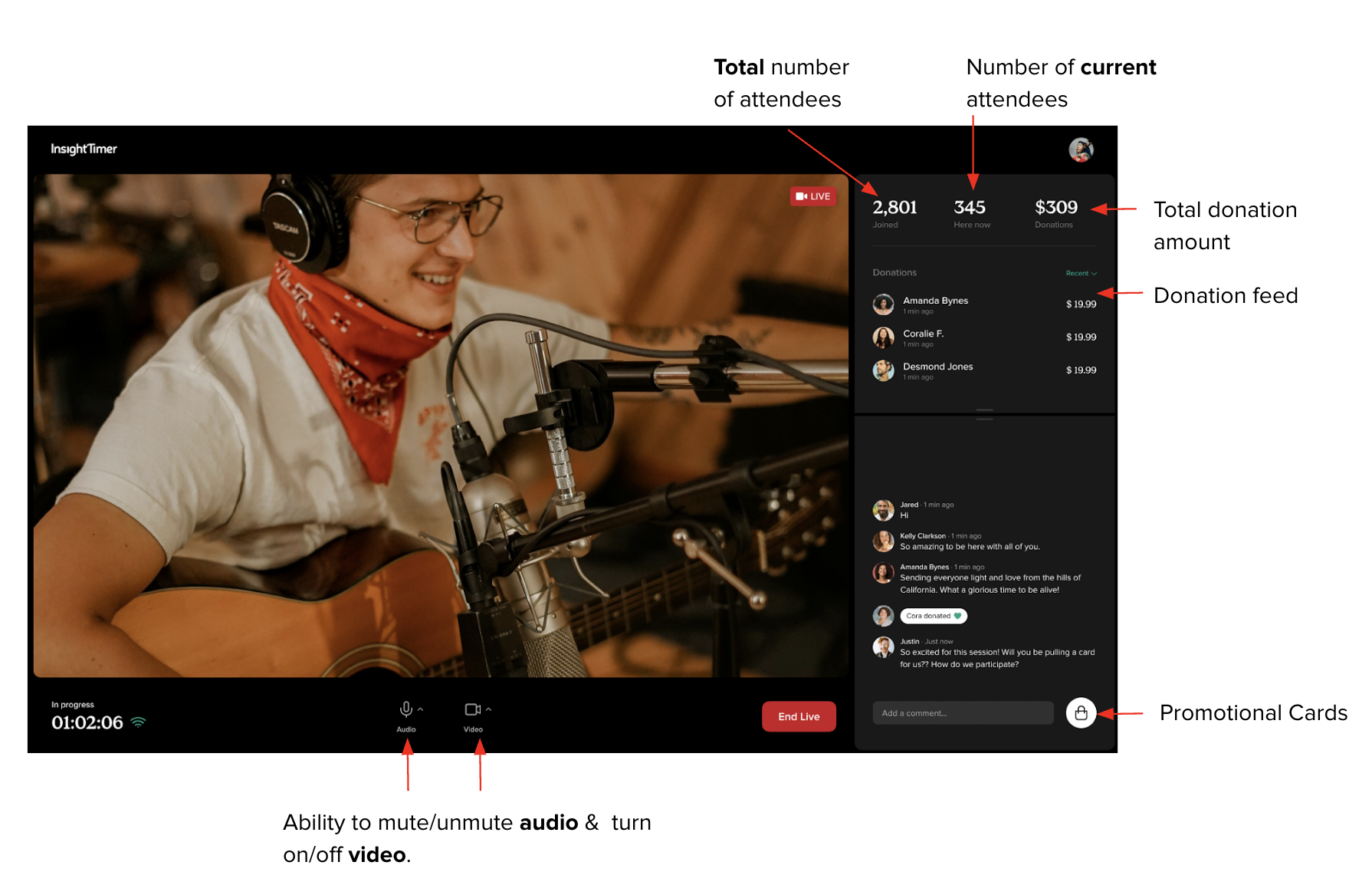
Your live event hosting screen is divided into several sections, each designed for a specific purpose. On the left side, you'll see the main broadcast view with controls for your audio and video. On the right side, you'll see the Stats Panel, which displays real-time information about your attendees and donations. This layout lets you monitor everything happening during your event without any distractions.
The Stats Panel: Real-Time Session Insights
The Stats Panel sits on the right side of your hosting screen during a live event. It gives you real-time data to help you understand and manage your session as it happens. This panel is your window into how your audience is engaging with your teaching and what's happening in your event at any given moment.
The Stats Panel displays:
- Total number of community members who've joined the event since it began
- Number of members currently attending live in real time
- Total donation amount received from attendees throughout your session
- A detailed donation feed that you can sort by time of donation or by amount of donation
These insights let you track engagement and generosity in real time, so you know how your live event is resonating with your audience. You can see who's supporting your work through donations and watch your attendance numbers grow as more people tune in. This data helps you understand what's working and how to connect with your community members better.
Host Controls: Managing Your Event Audio and Video
As the host, you have straightforward controls to manage your audio and video during the session. These controls are essential for delivering a smooth, professional experience to your community members and ensuring they can hear and see you clearly.
As the host, you can:
- Mute and unmute your microphone as needed during your session
- Turn your video on and off to control what your audience sees
These controls are easy to find and use, so you can focus on delivering your meditation, mindfulness practice, yoga, breathwork, or other content without fumbling with technical settings. Everything you need is right there on your hosting screen, always accessible during your event.
Promotional Cards: Showcase Your Offerings and Grow Your Audience
You'll see a Promotional Cards button in your hosting interface. This powerful feature lets you promote content and encourage engagement during your event. With promotional cards, you can highlight your retreats, courses, premium group meditations, or other live events. You can also use them to encourage attendees to follow you on the platform or make a donation to support your teaching and mission.
The promotional cards feature is an excellent way to grow your audience, increase enrollment in your courses, and build support for your work as a teacher on Insight Timer. You can create multiple cards with different messages and display them strategically throughout your session to maximize their impact.
Note: The Promotional Cards feature will become available in mid-May 2025 once the feature is enabled on your account. This is a new capability designed to help teachers like you reach more people and grow your community.
Here's an example of what your hosting screen looks like in action:
Setting Up and Using Promotional Cards
Want to create promotional cards for your live events? We've got a detailed guide to help you set them up and use them effectively. Read the promotional cards setup article for comprehensive step-by-step instructions on creating, managing, and deploying your promotional cards during events.
If you have questions about any of these features or run into any issues while hosting your live event, we're here to help. Reach out to us at publishers@insighttimer.com and we'll get you the support and guidance you need to make your events successful.