
Video on Insight Timer
Insight Timer is expanding into video to help teachers deepen their teachings and offer our community a more immersive learning experience.
Video content on Insight Timer should feel calm, intentional, and authentic. We encourage teachers to focus on meaningful guidance rather than fast-paced or highly produced content.
Simple, well-prepared videos that reflect presence, clarity, and genuine connection often create the most powerful experiences for our community.
These guidelines are designed to help teachers create video content that maintains the trusted, peaceful environment Insight Timer is known for.
Supported Content Types
All video content on Insight Timer should be intentional, structured, and wellness-oriented.
Allowed Content Types
- Guided meditation
- Yoga & movement (including fitness, Pilates, stretching)
- Educational or lecture-style content
- Wellness-oriented music
Not Allowed
- Silent or unguided meditation
- Unstructured or free-form talking
- Personal storytelling without a clear purpose
- Promotional or marketing content
- Entertainment-focused content
Video Publishing Formats
Teachers can publish the following types of video content.
Free Videos
- Made available to all Insight Timer users at no cost
- Must meet all video standards and function as complete, standalone content
Premium Videos
- Available exclusively to MemberPlus subscribers
- Must meet all video standards and function as complete, standalone content
- You must publish at least 5 free videos before uploading any premium content
Video Series / Courses
- Structured, multi-lesson video programs offered behind a paywall
- Content should be organized, intentional, and progressive across lessons
Audio vs Video Guidance
- At this time, please do not re-upload content that is already published on Insight Timer as audio in video format (e.g., adding visuals or background footage to an existing audio track)
- Instead, choose the format — audio or video — that best supports the experience you want to create, and publish a single, intentional version
Performance-Style Video Content Guidance
Performance-style video content - including music, storytelling, and meditative readings - should only be published in video format when the visuals meaningfully enhance the overall experience.
- Music performances are a strong fit for video
- The use of real-world, well-produced visuals or broll is permitted (e.g. nature footage like oceans, forests, landscapes)
- Do not use artificial or animated visuals or broll (including AI-generated visuals, animated loops, or stock motion graphics)
- AI may enhance real footage, but must not generate visuals
Video Structure, Tone, & Formatting
Videos should be intentionally produced, well-structured, and easy to follow from start to finish.
Structure
- Begin with a clear introduction (what the video covers, who it’s for, what to expect, and any relevant considerations such as sensitive topics or physical limitations)
- Deliver focused, well-paced content
- End with a clear closing, share gratitude, and encourage your audience to return for their next practice
Flow & Pacing
- Start and end cleanly (no long pauses or setup footage)
- Maintain a steady, intentional pace
- Avoid rambling or unclear direction
Preparation
- Prepare an outline in advance
- Content should feel structured, not improvised
Delivery Style
- Speak naturally and conversationally
- Address your audience directly (“you”)
- Maintain a calm, supportive tone
Clarity & Inclusivity
- Provide clear, easy-to-follow instructions
- Avoid assumptions about the viewer’s experience or background
Video Quality
Videos must appear intentional, polished, and curated. Content should be easy to watch on a mobile device and free from visual distractions.
Requirements
- Minimum resolution: 720p (1080p recommended)
- Accepted formats: 16:9 (horizontal) or 9:16 (vertical)
- Minimum duration: 1 minute
- Maximum file size: 10GB
- Footage must be sharp and in focus
- Camera must be stable (no shaking or unintentional movement)
- Subject must be clearly framed and visible
Lighting
- Subject must be clearly visible and well-lit
- Use even, soft lighting (natural light works well)
- Avoid shadows, overexposure, or backlighting
- Ensure consistent lighting throughout the video
Framing
- Camera is set at eye level for practices framed from the chest up
- Camera is set at chest level for content capturing full-body movement
Environment
- Space must be clean, uncluttered, and intentional
- Background aesthetics should feel calm and not distracting
Visual Style
- Use natural, true-to-life colors
- Avoid heavy filters or stylized effects
- Most content can be effectively captured with a single, static camera, though multi-camera setups are permitted if they enhance the content
Personal Presentation
- When appearing on-camera, wear appropriate, family-friendly, non-distracting clothing (men must wear a shirt; women may wear appropriate sports bra-style tops)
- Recommend choosing solid colors or minimal patterns, and avoid prominent logos or branding
- Make sure your clothing contrasts with your background so you remain clearly visible - especially for movement-based classes
- Keep hair styled away from your face
Audio Quality
Audio must be clear, consistent, and easy to understand.
Requirements
- Voice must be crisp and clear at all times
- Volume must remain consistent throughout the video
- No echo, distortion, or background noise
- If background music or sound elements are included, they should not overpower or compete with the voice
Best Practices
- Use an external microphone when possible
- Record in a quiet, controlled environment (soft surfaces like rugs, curtains, and furniture help minimize echo)
Avoid
- Heavy background noise (traffic, wind, appliances, etc.)
- Audio effects or over-processing
The following videos demonstrate excellent video and audio quality:
Ancient Stone Church Heart Chakra Meditation
Morning Grounding & Intention Setting
Astro Yoga Flows For Achieving Your Goals
On-Screen Graphics (GFX)
Videos should remain visually simple and calm. At this time, we ask that teachers do not include any on-screen graphics or text layered over the footage to help video content across Insight Timer feel cohesive, unified, and polished.
Educational Exception
Minimal text may be used only when it clearly supports instruction in educational content. If the text does not improve understanding, it should not be included. The following guidelines apply when on-screen GFX are used:
Requirements
- Use clean, professional fonts (no cursive, novelty, or decorative fonts)
- Text must be large enough to be easily readable on mobile screens
- No distracting movement, bouncing, sliding, or complex transitions (simple fade in/out is acceptable)
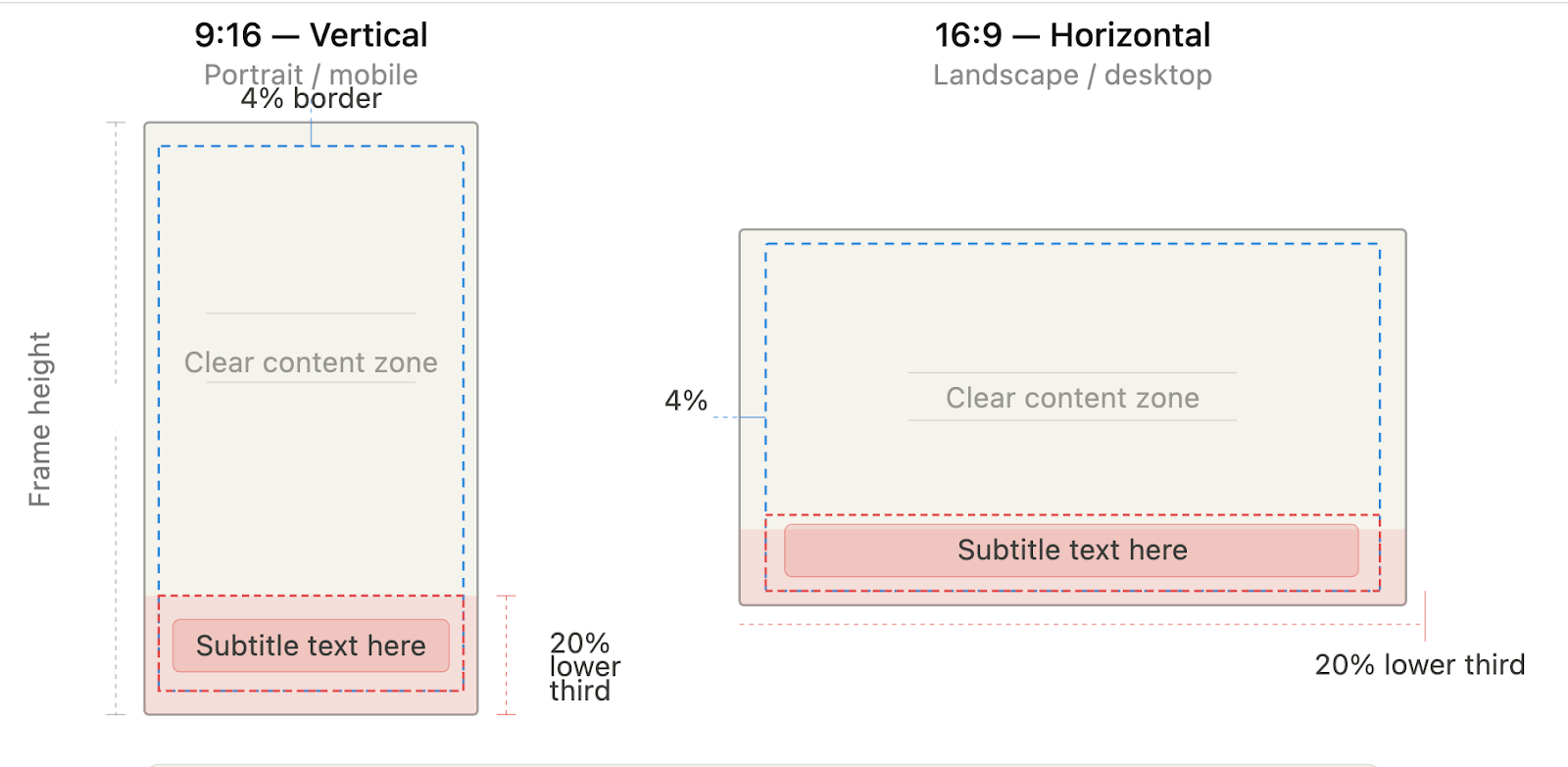
- Must remain within designated safe zones (see reference)
- Teachers are responsible for ensuring all on-screen text is factually accurate and properly copyedited
- Plagiarism is not tolerated; any quotes, teachings, or sourced material must be clearly and properly attributed
Not Allowed
- Subtitles or captions embedded in the video (these are provided by the platform)
- Text overlays, logos, watermarks, or branding
- Social handles, URLs, or any other promotional content
- Decorative or non-essential graphics
Please use the wireframes below to gauge safe zones for on-screen graphics
Title & Description
Titles and descriptions must be clear, accurate, and aligned with the content.
Title Requirements
- Use Title Case (e.g., “Morning Meditation for Stress Relief”)
- Clearly reflect the content of the video
- Keep it simple and descriptive
Avoid
- Promotional or exaggerated language
- Emojis or special characters
Description Requirements
- Minimum 200 characters
- Clearly explain what the video includes and what to expect
- Provide helpful context (focus, intention, who it’s for, etc.)
Avoid
- External links
- Promotional language
- Emojis or decorative elements
Thumbnail Images
Thumbnails are the first impression of your video and should accurately reflect the content and experience viewers can expect.
Requirements
- High-resolution image (no blur or pixelation)
- Must not include text, logos, or overlays
- Must be owned or royalty-free
Best Practices
- Preferred: a high-quality photo taken during the recording session
- Acceptable: a clean screenshot pulled directly from the video
- If the teacher is the primary subject of the video, they should be visible in the thumbnail
Stock imagery (limited use)
- Stock images are discouraged and should only be used in rare cases
- If used, they must closely match the actual video content and tone
Avoid duplicate thumbnails
- Each video should have a distinct thumbnail
- Reuse is discouraged, but acceptable for clearly defined series with consistent structure and intent
Content Restrictions
The following content is not allowed under any circumstances:
- Hyper-political content
- Discrimination or hate speech
- Promotion of mind-altering substances
- Financial services or money-making schemes
- Hypnosis
- Suicide-related content
- Content led by individuals under 16
- Explicit sexual content
- Videos with on-screen GFX only and no dialogue
Content Safety, Credentials & Rights
All content must be safe, responsible, and compliant. Teachers are responsible for ensuring their content is appropriate, properly qualified, and legally owned.
Sensitive Topics
- Use calm, respectful, and non-graphic language
- Avoid sensationalizing or dwelling on harmful experiences
- Content should focus on support, healing, and wellbeing
Required Safeguards
- Include a verbal trigger warning at the beginning of the video and in the description (where applicable)
- Clearly state that the content is not a substitute for professional care or treatment
Claims & Scope
- Do not make medical, psychological, or scientific claims
- Do not present content as a replacement for professional support
Safety Notice
- If content may cause drowsiness or deep relaxation, include a reminder to avoid activities such as driving or operating heavy machinery
Credentials
- Accreditation is required for specialized practices, including but not limited to: MBSR, ACT, psychology, neuroscience, Wim Hof Method, yoga lineages, and breathwork
- Credentials must be uploaded to: Teacher Profile → Accreditations
Copyright & Ownership
You must own or have permission to use all content included in your video.
This includes:
- Video footage
- Audio recordings
- Music
- Images
Violations will result in removal of content.
AI Usage Guidelines
AI may support production, but must not replace the teacher.
Allowed
- Editing support (cutting, color correction, noise reduction)
Not Allowed
- AI-generated narration or voices
- Fully AI-generated videos or content
Requirement
- Your real, recorded voice and presence must be present throughout the video
Final Check
Before uploading, ensure your video is:
- Visually sharp, well-lit, and distraction-free
- Clear and easy to hear
- Thoughtfully structured from beginning to end
- Free from on-screen text or graphics
- Aligned with Insight Timer’s calm, supportive experience
We reserve the right to reject any content that does not meet our video standards.
Please reach out to us via publishers@insighttimer.com if you have any questions or concerns.