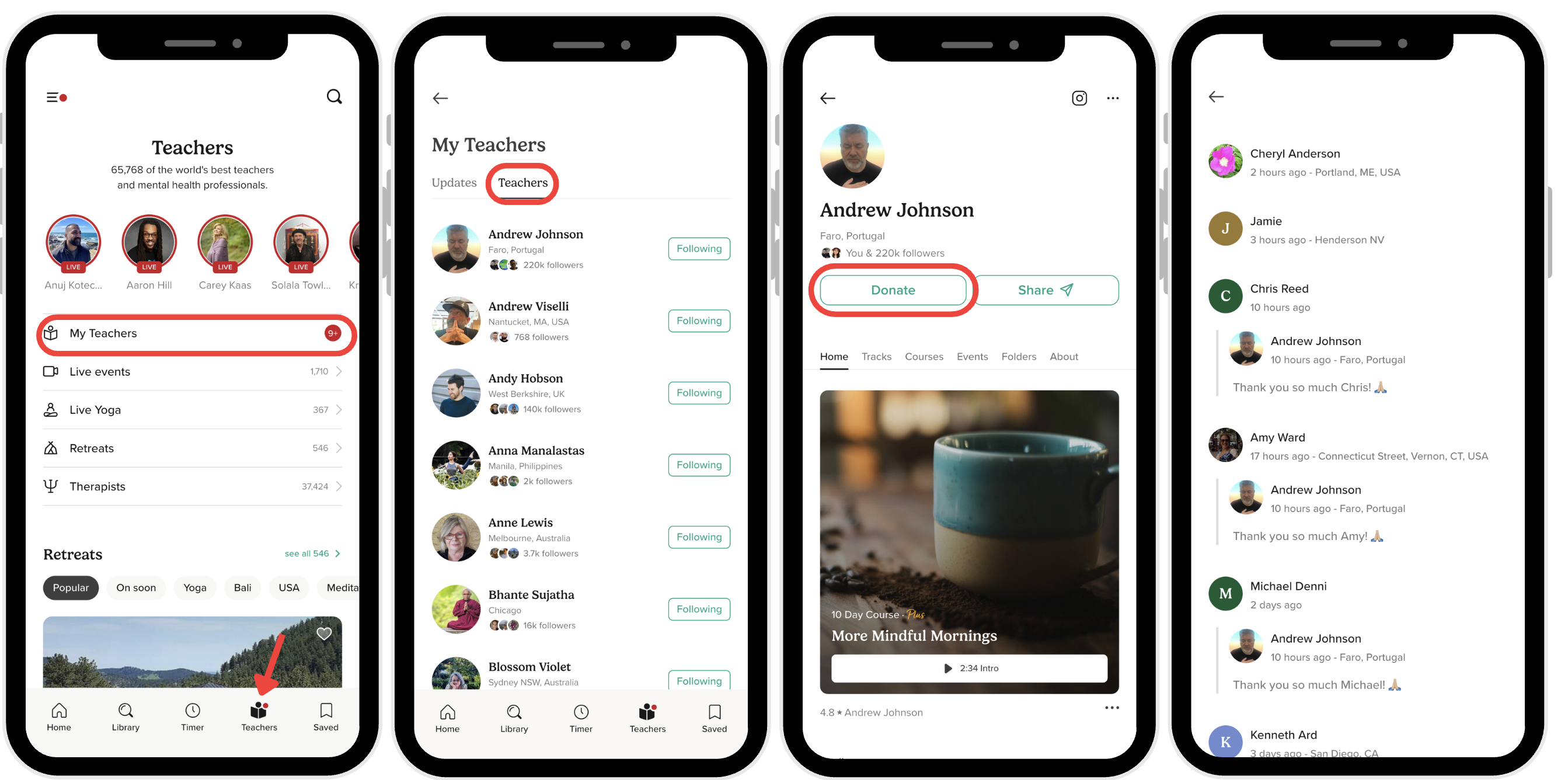
How to View Your Teacher's Donation Reply
When a teacher responds to your donation, their message appears right on their profile. Here's how to read it:
Steps to Find Your Teacher's Reply
- Open the Insight Timer app and tap the Teachers tab (the fourth icon at the bottom of your screen).
- Make sure the Teachers tab at the top is selected so you're viewing the full teacher directory.
- Tap on your teacher's name to open their profile page.
- Tap the Donate button on their profile. (You'll need to follow the teacher first before you can see the donation option.)
- Scroll down to the donation section, where any replies and thank-you messages from the teacher will show up.
What You'll See
Any message the teacher sent in response to your donation will be visible there for you to read. Some teachers like to send personalized thank-yous, while others might share how they plan to use the support. It's a nice way to connect with teachers you're supporting and see the direct impact your donation has on their ability to share their practice with our community.