
Use Insight Timer in Claude and ChatGPT to discover and listen to meditation, sleep, spiritual, and wellbeing audio and video content directly inside your AI conversations using natural language.
Overview
The Insight Timer Connector for Claude and the Insight Timer app for ChatGPT provide access to the world's largest free emotional health, meditation, sleep, and mental wellbeing library with 300,000+ tracks, including guided meditations, sleep tracks, breathwork, dharma talks, and meditation music.
Claude and ChatGPT can:
- Search for meditation and mindfulness content by theme, practice, or tradition.
- Filter results by content type, duration, language, and voice gender.
- Find content from specific teachers or publishers.
- Return playable tracks to start listening.
Use the connector to find meditation practices, spiritual teachings, and calming music based on your needs, mood, or interests.
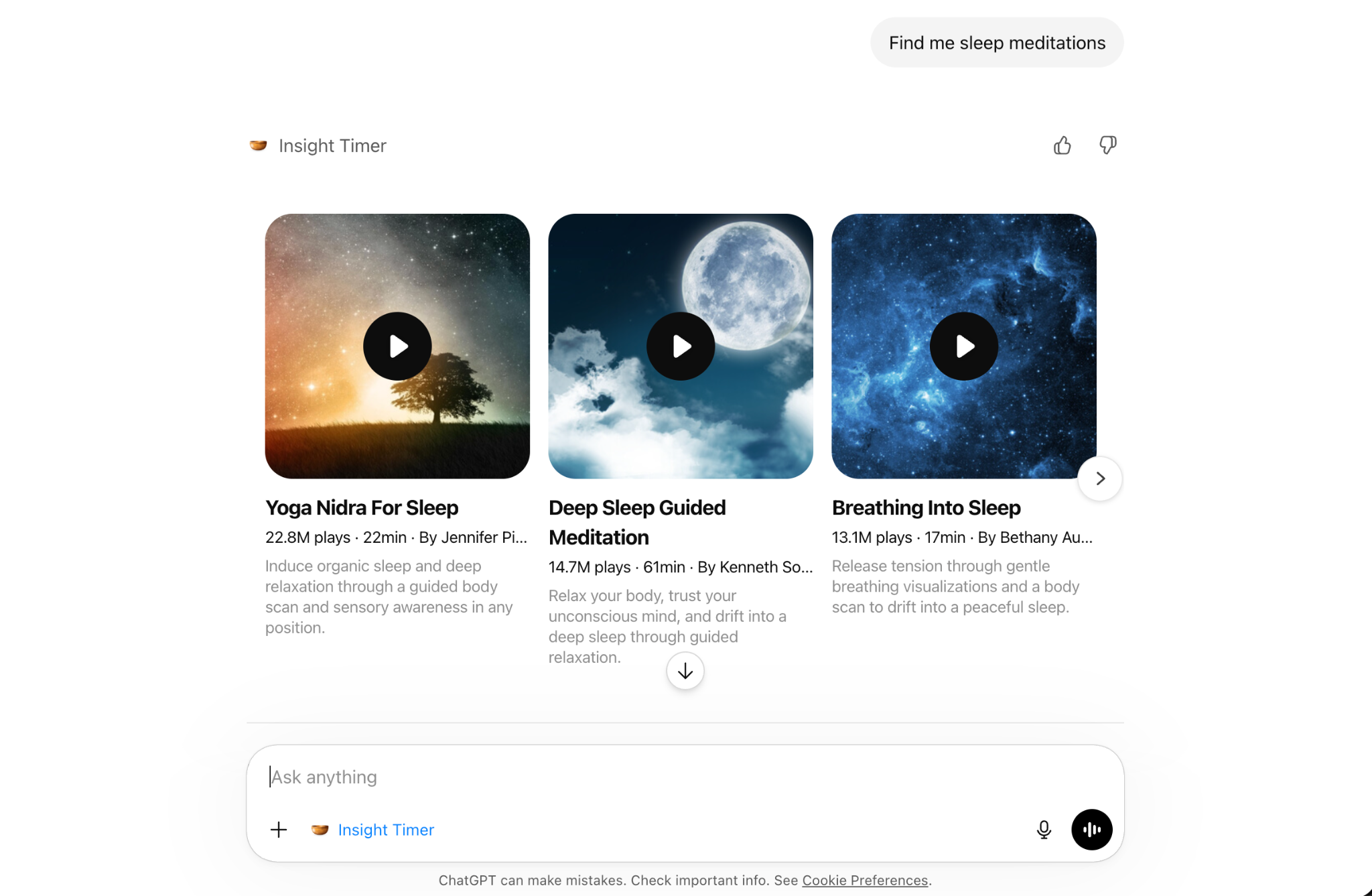
Results are displayed as interactive playable cards directly in Claude and ChatGPT. You can play content right in the chat interface or open it on Insight Timer's platform for the full experience.
Capabilities
Results are displayed as interactive playable cards with track title, teacher name, duration, play count, and built-in playback controls. You can play content directly in the chat or open it on Insight Timer.
Limitations
The Insight Timer Connector does not support:
- Downloading content for offline listening (use the Insight Timer app for offline access).
- Creating custom meditations or guided practices.
- Accessing your Insight Timer account or listening history.
- Finding in-person retreats, workshops, or courses.
- Creating meditation schedules or reminders.
Where the connector works
The Insight Timer Connector works on:
Setup
Setup for Claude
Setup steps:
- Open Claude.ai and go to the Customize > Connectors > Click add (plus icon) > Browse Connection: https://claude.ai/customize/connectors
- Find the Insight Timer connector and click add (plus icon).
- Follow the connection steps shown in Claude.
- Start asking about meditation or wellbeing content in chat.
Setup for ChatGPT
Setup steps:
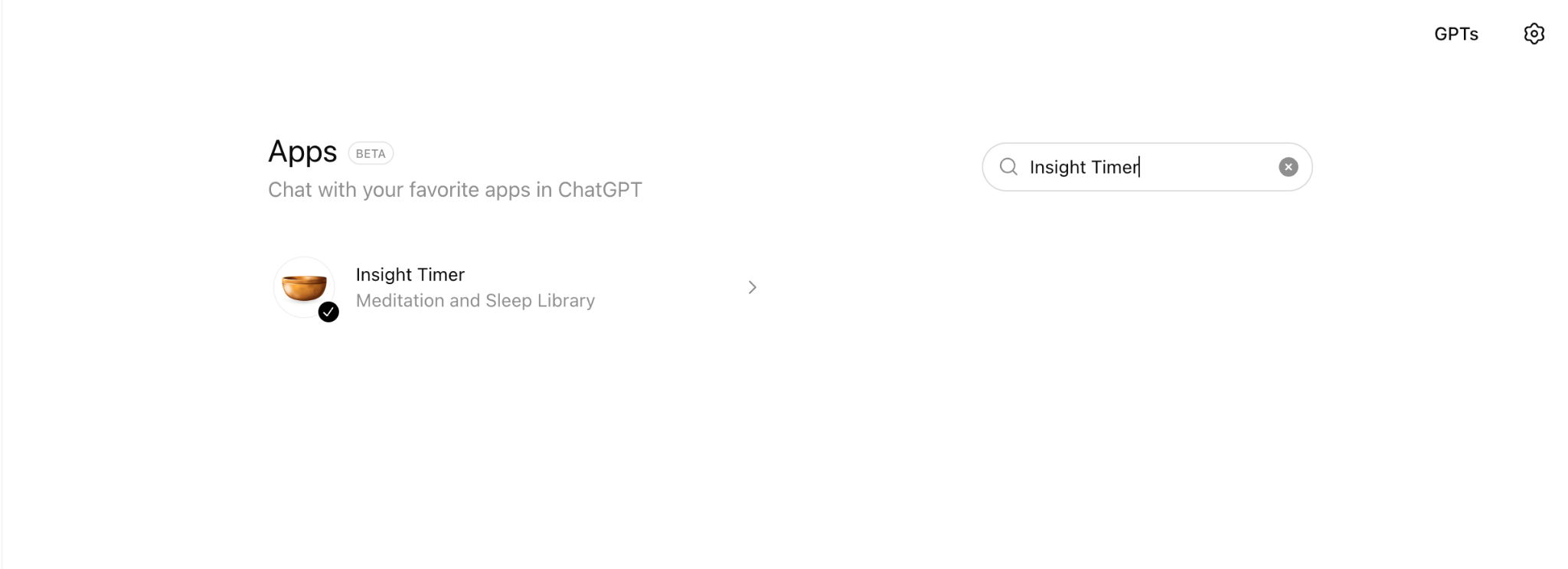
- Open ChatGPT and go to the Apps Directory: https://chatgpt.com/apps
- Find the Insight Timer app and select Connect. You can also access the app directly using this link: https://chatgpt.com/apps/insight-timer/asdk_app_6985455f9ad48191954c37eddafc782d
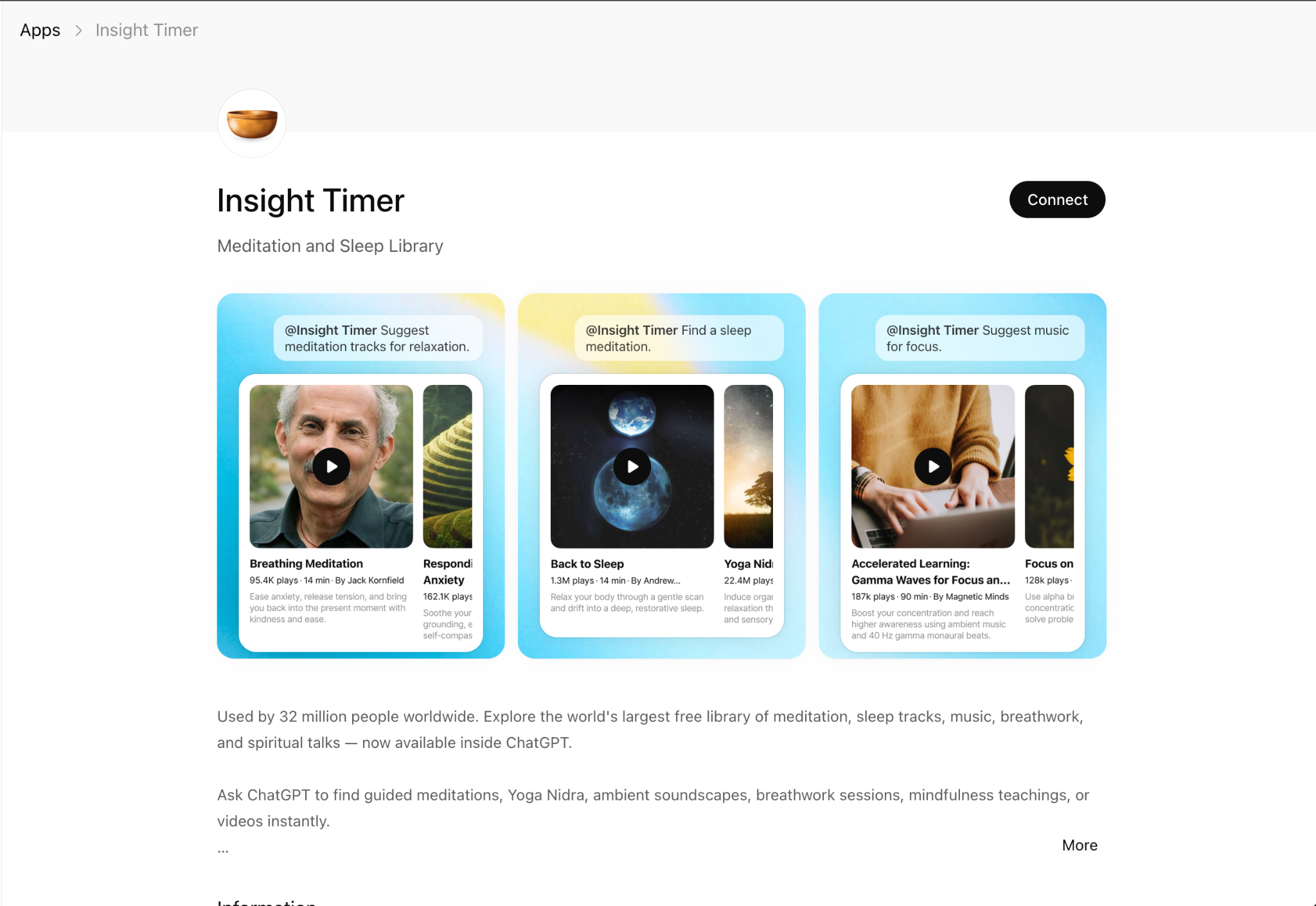
3. Follow the connection steps shown in ChatGPT.
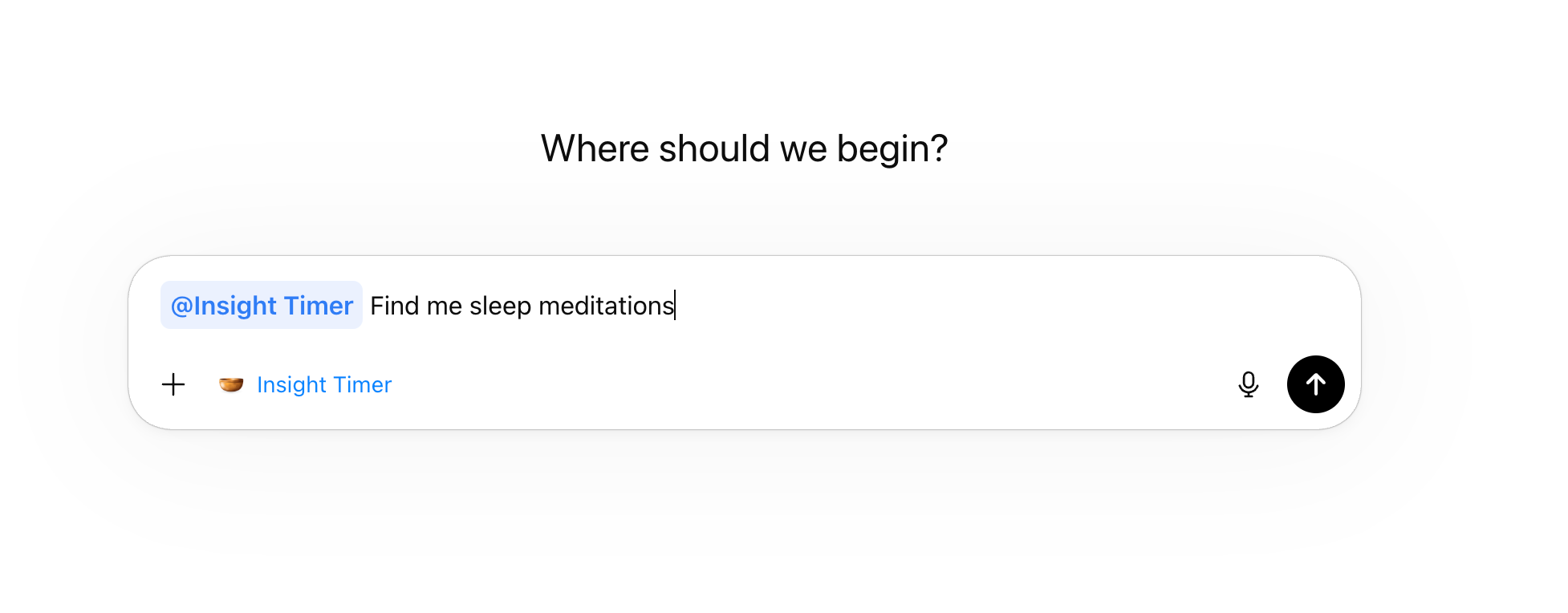
4. Start asking about meditation or wellbeing content in chat by mentioning @Insight Timer
Authentication
No authentication is required to search for meditation content.
The connector is open to all users without requiring an Insight Timer account or login.
Data shared with Insight Timer
When you search for meditation content, Claude or ChatGPT sends only the information needed to perform the search, such as:
- Search queries (e.g., "sleep meditation", "anxiety relief")
- Selected filters (e.g., duration, content type, language)
Insight Timer does not receive:
- Your Claude or ChatGPT chat history
- Personal information or account details
- Any data beyond the specific search parameters
Data source
Meditation content and search results are provided by Insight Timer's library of 300,000+ tracks.
Claude and ChatGPT retrieve and summarize content through the Insight Timer Connector, but all tracks, teachers, and details come directly from Insight Timer's platform.
Availability and content
Content availability can change as new tracks are added and some may be removed. The information shown is based on the latest data available at the time of the search.
Tool: Search Content
The Insight Timer Connector provides one primary tool for discovering meditation and wellbeing content.
search_content
Purpose: Search Insight Timer's library for guided meditations, dharma talks, and meditation music.
What it does:
- Searches 280,000+ audio and video tracks
- Filters by content type, duration, language, and voice preferences
- Returns top matching results with playable links
- Provides context-aware recommendations based on your needs
Parameters you can specify:
What you get back:
- Interactive playable cards to play the track directly in the chat
- Top 3 recommended tracks
- Track title and teacher name
- Duration and play count
- Personalized description explaining why it fits your request
- Link to open on Insight Timer for the full app experience
Important notes:
- Each search returns a maximum of 3 tracks
- Results are displayed as interactive playable cards with built-in controls
- You can play content directly in the chat interface
- Tap the Play button on any card to start listening
- You can also open tracks on Insight Timer's platform for additional features
Example questions you can ask
These examples show common ways to ask Claude or ChatGPT to search for meditation content using the Insight Timer integration.
Example 1 - Find a meditation for a specific need
User prompt: "Find me a calming meditation."
How the AI responds:
- Searches Insight Timer for anxiety and sleep-related content
- Returns 3 recommended guided meditations
- Provides brief descriptions of why each track fits your need
- Includes links to start listening
You can ask follow-ups such as: "Show me shorter options under 10 minutes", "Find one with a female voice"
Expected behavior: You receive personalized meditation recommendations displayed as interactive playable cards. Tap the Play button to start listening directly in the chat, or open the track on Insight Timer for the full experience.
Example 2 - Search by spiritual tradition or teaching
User prompt: "Find Buddhist meditation talks about mindfulness for beginners."
How the AI responds:
- Filters for "talks" content type (teachings vs. guided practices)
- Searches for Buddhist tradition and mindfulness topics
- Returns dharma talks suitable for beginners
Expected behavior: You receive teaching content from Buddhist teachers explaining mindfulness concepts.
Example 3 - Find content from a specific teacher
User prompt: "Find a body scan meditation by Jon Kabat-Zinn."
How the AI responds:
- Searches specifically for content by Jon Kabat-Zinn
- Filters for guided meditations (vs. talks or music)
- Focuses on body scan practices
Expected behavior: You receive body scan meditations from the requested teacher.
Example 4 - Get music for focus or relaxation
User prompt: "I need hour-long nature sounds for studying."
How the AI responds:
- Filters for "music" content type (instrumental, no voice)
- Sets duration filter to 60+ minutes
- Searches for nature sounds themes
Expected behavior: You receive instrumental nature soundscapes suitable for extended study sessions.
Example 5 - Find video meditation content
User prompt: "Find video meditations for yoga practice."
How the AI responds:
- Filters for "video" content format
- Searches for yoga-related meditation content
- Returns video-based guided practices
Follow-up examples: "Show me audio-only options instead", "Find video teachings about breathwork"
Expected behavior: You receive video content that you can watch and follow along with on Insight Timer.
Example 6 - Compare and refine results
User prompt: "Find morning meditations to start my day."
Follow-up prompt: "Which of these is best for energy and motivation?"
How the AI responds:
- First search returns 3 morning meditation options
- Keeps results in context for comparison
- Analyzes and recommends based on your specified criteria
- You can further refine (e.g., "Show me the shortest one")
Expected behavior: You can explore, compare, and refine meditation options without starting over.
Troubleshooting
Common issues and solutions
Issue: "No results found"
Possible causes:
- Your search query is too specific or narrow
- The requested combination of filters has no matching content
- Content in your requested language may be limited
Solutions:
- Try broader search terms (e.g., "stress" instead of "workplace stress management")
- Remove some filters (e.g., don't specify both teacher name and duration)
- Ask for content in English if searching in another language returned no results
- Request alternative suggestions: "Show me similar meditations"
Issue: "How do I control playback?"
Explanation: Results are displayed as interactive cards with built-in playback controls directly in Claude or ChatGPT.
How to use:
- Tap the Play button on any card to start listening
- Use Pause to stop playback
- Playback controls appear on each track card
- You can play one track at a time
- Optionally, click the track link to open it on Insight Timer's platform for additional features (like saving to playlists, downloading for offline use, etc.)
Issue: "Results don't match what I asked for"
Possible causes:
- Your request was ambiguous or contained multiple different needs
- The AI interpreted your request differently than intended
Solutions:
- Be more specific about what you're looking for
- Specify content type: "I want a guided meditation, not a talk"
- Mention duration: "Find something under 15 minutes"
- Ask for specific teachers if you have preferences
- Provide feedback: "That's not quite right, I wanted something more calming"
Issue: "I want more than 3 results"
Explanation: Each search returns up to 3 recommended tracks to keep results focused and personalized.
Solutions:
- Ask for "more options" or "show me more results" to see the next set
- Refine your search with different filters to see alternative options
- Make multiple searches for different aspects (e.g., search separately for morning and evening meditations)
Issue: "Insight Timer isn’t appearing in Claude or ChatGPT"
Possible causes:
- The connector isn't installed or enabled
- You're using an unsupported platform (e.g., Claude Code)
Solutions:
- Check that you've completed the setup steps above
- Verify you're using Claude Web, Claude Desktop, Claude Mobile, or ChatGPT
- Try disconnecting and reconnecting the Insight Timer connector
- Restart Claude/ChatGPT and try again
Issue: "Links to tracks aren't working"
Possible causes:
- Network connectivity issues
- Content may have been removed or made private
- Regional restrictions may apply
Solutions:
- Check your internet connection
- Try opening the link in a different browser
- Search for similar content as an alternative
- Contact Insight Timer support if specific content is consistently inaccessible
Getting help
If you encounter issues you can visit Insight Timer Support: https://help.insighttimer.com/support/home
Best practices for using the Insight Timer Connector
Get better search results
- Start broad, then refine
- Begin with general terms like "sleep meditation"
- Add filters after seeing initial results: "Show shorter options"
- Specify your intent
- Mention your goal: "for anxiety", "to fall asleep", "for focus"
- This helps the AI recommend more relevant content
- Use natural language
- Ask conversationally: "I need sleep meditation"
- You don't need to use technical meditation terminology
- Request content types explicitly
- "Find guided meditations" (teacher-led practices)
- "Find talks about Buddhism" (teachings and lectures)
- "Find music for studying" (instrumental, no voice)
Make the most of results
- Use the interactive playback cards
- Tap Play directly on any card to start listening in chat
- No need to leave the conversation to begin your practice
- Open on Insight Timer for advanced features (playlists, downloads, etc.)
- Compare options before choosing
- Ask: "Which of these is best for beginners?"
- Request: "Compare the first two options"
- Save time by specifying duration
- "I only have 10 minutes"
- "Find something for my lunch break"
- "I want a long session, over an hour"
- Explore different teachers
- Try: "Find similar meditations from other teachers"
- Ask: "Who else teaches body scan meditations?"
- Create themed playlists
- Search for morning, midday, and evening practices separately
- Build a collection for different moods or needs
Privacy and data handling
What gets shared
When you use the Insight Timer Connector:
✅ Your search queries are sent to Insight Timer to find matching content
✅ Your filter preferences (duration, type, language) are sent for accurate results
What doesn't get shared
❌ Your full conversation history with Claude or ChatGPT
❌ Personal information or account details
❌ Your Insight Timer listening history or preferences
❌ Any other conversations or unrelated searches
Data usage
- Search queries are used only to return relevant meditation content
- Insight Timer does not track or store your Claude/ChatGPT activity
- Your searches are not connected to your Insight Timer account (if you have one)
Frequently Asked Questions
Is Insight Timer in Claude and ChatGPT free to use?
Yes, the connector is completely free. Insight Timer also has a free library of 300,000+ tracks, though some premium content may require an Insight Timer Plus subscription.
Do I need an Insight Timer account to search?
No, you can search without an account. However, you may need to create a free account on Insight Timer to listen to the tracks.
Can I listen to the meditations directly in Claude or ChatGPT?
Yes! The connector displays interactive playable cards with built-in audio/video controls. Simply tap the Play button on any card to start listening right in the chat. You can also open tracks on Insight Timer's platform for additional features.
What playback controls are available?
Each track card includes Play and Pause controls. You can play one track at a time directly in the chat. For advanced features like creating playlists, downloading for offline listening, or tracking your meditation history, open the track on Insight Timer's app or website.
Do I need an Insight Timer account to play content?
No, you can play content directly in the interactive cards without an account. However, creating a free Insight Timer account unlocks additional features when you open tracks on their platform.
How current are the search results?
Results reflect Insight Timer's library in real-time. New content is regularly added, and the connector searches the most up-to-date catalog.
Can I find premium or Plus-only content?
No, search results only include free content. You can search for premium directly on Insight Timer's platform.
What languages are supported?
Insight Timer has content in many languages. You can specify your preferred language when searching, or ask Claude/ChatGPT to search in a specific language.
Can I request specific durations?
Yes! You can ask for specific time ranges like "5-10 minutes", "under 20 minutes", or "hour-long sessions".
What if I don't like the results?
You can refine your search by adding more details, changing filters, or asking for alternative suggestions. The AI will adjust based on your feedback.
Does this work offline?
No, you need an internet connection to search for content and stream it in the interactive cards. For offline listening, download tracks through the Insight Timer mobile app (available for some content with a free or Plus account).
References
- Insight Timer Website:https://insighttimer.com
- Insight Timer Help Center:https://help.insighttimer.com/support/home
- Claude Connectors Directory:https://claude.ai/customize/connectors
- ChatGPT App Directory:https://chatgpt.com/apps